
For businesses already running cync8 + Tally

One operating layer under sales, stock, finance, field work— and .

cync8 starts as a CRM connected to Tally. As more of the business moves onto it, it becomes the operating layer underneath everything — where records live, teams act, reports get pulled, and owners see what's moving. This page is that bigger picture.

Web and mobile Tally stays the accounting backbone Role-based from day one
app.cync8.com
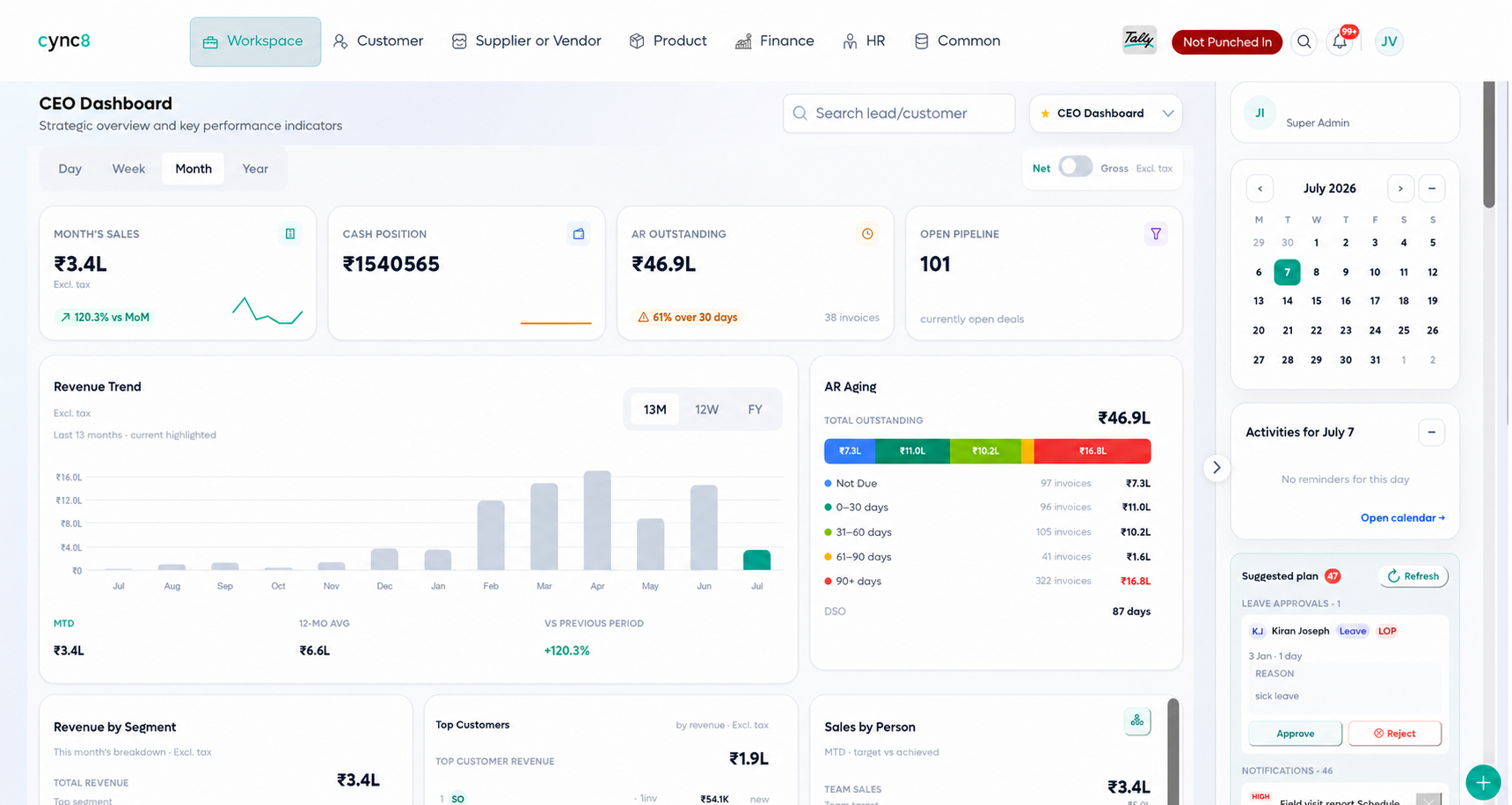
cync8 dashboard showing sales, cash position, receivables and team performance in one view
01The operating layer

Three ways to look at
the same business.

Every hub draws from the same connected data — records, actions and the reports built from them. Nothing here lives in a separate spreadsheet.

cync8 platform

Business records, team actions and reports — one connected system, web and mobile.

Web + Mobile
HUB 01

Business records

  • Customers & leads
  • Vendors & suppliers
  • Items, stock & batches
  • Quotations & orders
  • Invoices & vouchers
  • Tally ledgers

One version of who owes what, what's in stock, and what's on order — not three spreadsheets and a WhatsApp thread.

HUB 02

Team actions

  • Follow-ups & reminders
  • Field visits & check-ins
  • Office tasks & approvals
  • Quotation sign-off
  • Attendance & leave
  • Assignments

Every action has an owner, a status and a next step — visible to a manager without a phone call.

HUB 03

Reports & dashboards

  • Owner / MD view
  • Sales pipeline & targets
  • Finance outstanding
  • Inventory & reorder
  • HR attendance & leave
  • Business-wide reports

The same underlying activity, reshaped into the view each role actually needs to act on.

02The Tally-connected backbone

keeps the books.
cync8 runs the day.

Underneath every hub above, Tally remains the system of record for accounting. cync8 connects to it and keeps customer ledgers, invoices and receipts moving both ways, so the accounts team keeps working the way it already does.

Hoursto connect and start syncing
0replacement pain for accounts
Configuredsync scope, set per business
See exactly how the connection works
Onboarding Existing customers and ledgers pulled in first. Ongoing Activity and accounts stay lined up in the background. Outage-safe Queues and retries if the internet drops.
03Admin, roles & permissions

Set up once.
Run it safely everywhere.

Before a single lead is entered, someone has to decide who sees what. That setup lives here — company configuration, user roles, and multi-branch structure, done once by an admin, not re-explained to every new hire.

  • Pre-built roles for MD, sales, finance and field — or a custom permission set for your structure.
  • Multi-company and multi-branch from one login — built for group companies and India + UAE operations.
  • Company templates and setup carry over across branches, so new locations start from a known configuration.

Payroll, WhatsApp-based communication and an expense management module are on our roadmap, not live today — this page only describes what's in the product now.

Who sees what

Five roles cover most trading and distribution teams out of the box.

  • MDAdmin / MDFull business view — revenue, pipeline, inventory, HR and finance.
  • SMSales ManagerTeam pipeline, performance and follow-ups across the sales team.
  • SESales ExecutiveMy leads, my tasks, my targets — nothing they don't need.
  • FOFinance OfficerOutstanding invoices, payments, receipts and finance reports.
  • FAField AgentMy visits, my tasks, GPS check-ins and customer details.
04Book an assessment

See the platform on your business.

A one-hour working session — what stays in Tally, what runs in cync8, and which hub matters most for you first.